

Amazon self-ship orders are a reliable way to take charge of your logistics, reduce shipping costs, and create a unique customer experience. By using third-party couriers and carefully planning each step, you’ll enjoy a streamlined process and a more satisfied customer base.
Hi Reader,
If you’ve landed here, chances are you’re either an exporter just starting or an experienced seller looking to sharpen your strategies. Either way, after reading this blog, your strategies will change because Amazon self-ship orders might just be the game changer you’ve been searching for.
In the world of e-commerce, flexibility and control are everything. Self shipping, also known as self-ship, allows you to take charge of every step of the shipping process – from packaging to delivery – either by delivering products directly or by partnering with trusted third-party courier services like ShipGlobal.
This self shipping approach is a favourite among sellers who want to save on costs, customised packaging experience, or meet unique customer delivery preferences.

The best part?
Amazon self-ship orders give you the power to scale your business globally while keeping full control over your fulfillment process.
With access to Amazon’s massive global customer base of over 200 million people and the right self-shipping strategy, you can expand into new markets, build your brand presence, and ensure every order meets your quality standards.
Amazon shipping control and cost are managed directly by the seller in self-ship. By mastering self-ship orders, you not only save on certain fees but also create a more personalised delivery experience for your customers, strengthening trust and loyalty.
So, let’s dive in and explore how you can perfect your self-shipping approach to elevate your business and delight your customers worldwide.
What are Amazon Self-Ship Orders
Amazon self-ship orders are when you, the seller, take full control of packaging, labelling, and shipping products without relying on Amazon’s Easy Ship service. This method allows sellers to manage the shipping process independently and offers the flexibility to choose between two main options:
- Self-Delivery: You deliver the products directly to the customer. (Flexibility in Amazon logistics allows sellers to choose how and when they ship.)
- Third Party Couriers (3PL for Amazon Orders): You use a trusted delivery service to send your products to the buyer.
This approach is particularly beneficial for sellers who want more control over shipping costs, packaging styles, and delivery timelines.

Step-by-Step Self-Ship Process
Step 1: Log in to Seller Central
Start by logging into your Amazon Seller Central account to check your pending orders:
- Click on the Orders tab and select Manage Orders.
- In the Self-Ship section, you can view all pending orders, complete with order IDs, product details, and customer shipping addresses. This helps you keep track of what needs to be shipped and where.
Step 2: Prepare the Shipment
Once you select an order to process, follow these steps:
Packaging the Product
- Pack your products securely using sturdy materials to ensure they remain safe during transit.
- Use professional and appealing packaging, which can leave a positive impression on your customers. Amazon branded packaging materials are also available for purchase if needed.
Generating the Shipping Label
- Use a courier service to create a shipping label that includes both the sender’s and receiver’s addresses.
- Affix the label securely to the package to ensure it doesn’t come off during transit.
Step 3: Add a Tax Invoice
- Download the tax invoice from your Seller Central self-ship workflow account and place it inside the package. Note that Amazon no longer requires sellers to include a packing slip, saving time and resources.
Step 4: Select a Third-Party Courier
Choose a reliable courier service to ship your order. For example, many sellers prefer services like ShipGlobal due to their affordability and reliability. Once selected:
- Enter the ship date, carrier name, and tracking ID in your Seller Central account.
- Click on Self-Ship Confirm Shipment to update the order status and inform Amazon that the package has been shipped.
Step 5: Confirm the Shipment
After confirming the shipment:
- The order status changes from “Unshipped” to “Shipped” in Seller Central.
- Both you and your customer can track the shipment’s progress using the tracking ID provided by the courier service.
- Monitor the delivery status using the courier’s tracking tools to ensure timely and successful delivery.
Shipping Best Practices for Sellers
Which Third-Party Couriers to Choose
Third party couriers provide significant advantages for self-ship orders. Here are the key factors to consider:
- Affordable Rates: They often offer competitive shipping rates, especially for lightweight or bulk shipments.
- Customization: Sellers can personalise a customised packaging experience and manage delivery timelines according to their needs.
- Reliability: Trusted couriers like ShipGlobal, DHL and India Post ensure secure and timely deliveries, enhancing customer satisfaction.
Pro Tips for Fulfilling Amazon Self-Ship Orders
- Pick a Reliable Courier: Always opt for trusted courier services to ensure smooth and timely deliveries.
- Double-Check Everything: Verify customer details, tracking IDs, and packaging to avoid errors.
- Invest in Professional Packaging: High quality packaging protects your products and builds trust with your customers.
- Track Your Shipments: Use the courier’s tracking tools to monitor deliveries and address any delays promptly.

Seller Central Self-Ship Workflow (How It Works)
In the self-ship model on Seller Central, the seller is responsible for packing, shipping, and delivering orders directly to the customer.
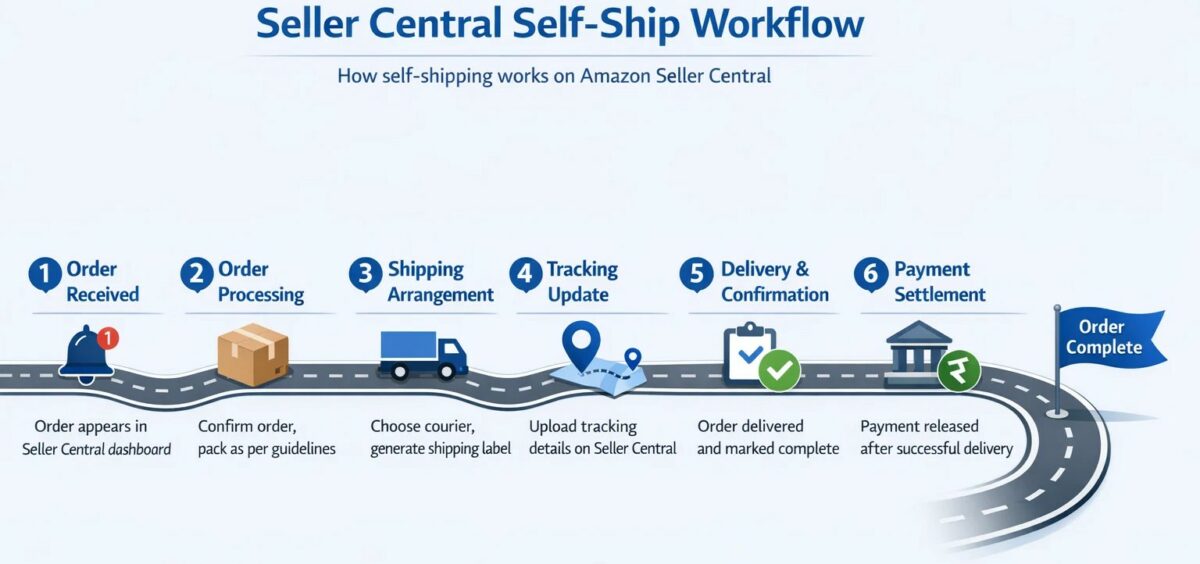
Typical workflow:
1. Order received: An order is placed on Seller Central and appears in your seller dashboard.
2. Order processing: You confirm the order, prepare the product, and pack it as per platform guidelines.
3. Shipping arrangement: You choose a courier, generate the shipping label, and dispatch the order yourself.
4. Tracking update: Tracking details are uploaded to Seller Central so the buyer can track the shipment.
5. Delivery & confirmation: Once delivered, the order is marked complete.
6. Payment settlement: Payment is released to the seller after successful delivery, as per the platform’s settlement cycle.
Best suited for:
- Sellers with their own logistics setup
- International sellers or exporters
- Businesses handling customised or low-volume shipments
Self-ship seller benefits include greater control over shipping and costs.
Final Thoughts
Managing your shipping process through Amazon self-ship orders can offer sellers greater flexibility and cost control. By choosing third party couriers that fit your business needs, you gain the freedom to tailor the entire shipping experience. This level of control not only helps reduce expenses but also allows you to add a personal touch, improving customer satisfaction and loyalty.
What makes Amazon stand out is the flexibility in its logistics throughout the fulfillment process.
Amazon self-ship orders are a reliable way to take charge of your logistics, reduce shipping costs, and create a unique customer experience. Self-ship seller benefits give sellers full control over order fulfillment. By using third-party couriers and carefully planning each step, you’ll enjoy a streamlined process and a more satisfied customer base.
But, how can you reduce Amazon’s shipping cost? Click here to know more, or if you are interested in reading about Self-ship vs Amazon FBA. Click here
FAQ’s
Self-ship gives sellers full control over customised packaging experience, labelling, and courier selection. Easy Ship, on the other hand, involves Amazon handling the shipping process on your behalf.
No, Amazon no longer requires a packing slip. However, including a tax invoice is mandatory.
Use the tracking tools provided by your courier service. Enter the tracking ID in Seller Central to keep your customers updated.
Monitor the tracking status and contact your courier service immediately to resolve delays. Keep your customer informed to maintain trust.
Yes, but ensure you choose a courier with expertise in cross-border shipping and handle customs documentation accurately.