
Picking between the Individual and Professional plan on Amazon mostly comes down to how much you plan to sell and what tools you’ll need along the way. Knowing the different Amazon seller account types makes that choice a lot easier. If you’re just starting out, our guide on how to sell on Amazon from India walks you through registration and the requirements you’ll need to meet.
The Amazon Individual vs Professional seller plan question usually boils down to fees, features, and the selling options each one gives you. Whether you’re leaning towards the Amazon Seller Central Individual plan or an Amazon Professional seller account, you should know what each one costs and what you get for it. It also helps to read up on Amazon FBA and how it works, since fulfilment costs can change which plan makes sense.
Here, we compare the Amazon seller plans side by side, break down how much an Amazon Professional seller account costs, and help you figure out which one fits the way you want to sell. And if you’re thinking about selling abroad, our guide on Amazon Global Selling vs Domestic FBA explains how the two routes differ.
Understanding Amazon Seller Plans
The key difference between the individual and professional accounts lies in their fees and available features.
Individual Seller Plan
The individual plan is suited for sellers who sell fewer than 40 items per month and prefer to avoid a monthly subscription fee. However, they are charged a fee of $0.99 for each item sold. If you’re just getting started and don’t expect to sell more than 40 items per month, the Individual plan is a good option.
Individual Seller Plan vs Professional Seller Plan
Individual Seller Plan
$0.99 per item sold
Basic tools to list and sell products
New or casual sellers with fewer than 40 items/month
Professional Seller Plan
$39.99/month (unlimited sales)
Advanced tools, ads, bulk listings, detailed reports
Established sellers scaling high-volume sales
Professional Seller Plan
The professional plan, on the other hand, is designed for sellers who expect to sell more than 40 items per month. This plan requires a monthly subscription fee of $39.99 but eliminates the per-item fee. Additionally, professional sellers benefit from advanced features such as bulk listing, advertising tools, and eligibility for top placement on product detail pages. If you plan to sell more than 40 items a month, the professional plan is a better choice.
Let’s Break this Down with an Example
Imagine two sellers, both passionate about handcrafted products but operating at different scales. One is a small handicraft seller who creates unique pieces in limited quantities, selling about 50 items per month. The other is a mid-sized handicraft seller with a steady customer base, managing to sell around 100 items monthly.
The small seller chooses the Individual Plan because it seems like the easier option—no monthly commitment, just a simple per-item fee. Meanwhile, the mid-sized seller, expecting consistent sales, opts for the Professional Plan.
Let’s do the math.
Now, here’s the real question: which seller is making the smarter financial decision? At first glance, the Individual Plan seems like a great deal – no commitments, no upfront costs. But as sales grow, so do the fees. The small seller, despite selling half as many products, is actually paying more than the mid-sized seller, simply because of how their plan is structured. Wouldn’t it make more sense to switch to the Professional Plan once sales cross 40 items per month?
So, if you’re a seller, where do you stand? Are you just starting out, testing the waters with a few sales here and there? Or are you seeing a steady demand for your products? If you’re selling more than 40 items a month, why pay more when you could be keeping more of your profits?

Why Choose a Professional Seller Account
Still unsure about upgrading to a Professional plan? Here are some big advantages that might help you decide:
Comparison Table: Individual Seller Plan Vs Professional Seller Plan
| Feature | Individual Plan | Professional Plan |
|---|---|---|
| Subscription Fee | $0.99 per item sold | $39.99 per month |
| Listing Products | One at a time | Bulk listing tools |
| Inventory Management | Individual entries | Bulk management |
| Order Fulfilment | Manual processing | Advanced options |
| Pricing Tools | Static pricing only | Dynamic pricing |
| Access to Reports | Basic reports | Detailed analytics |
| Promotions and Advertising | Not available | Available |
| Eligibility for Buy Box | Not eligible | Eligible |
| Additional Users | Single user | Multiple user access |
| Branding Tools | Not available | Enhanced brand tools |
| API Integration | Not available | Available |
| Restricted Categories Access | Not eligible | Eligible to apply |
| Fulfilment by Amazon (FBA) Access | Available | Available |
| Amazon Marketplace Web Service (MWS) | Not available | Available |
By understanding these distinctions, you can select the plan that best aligns with your business goals and operational needs.

The Professional plan offers advanced features suitable for businesses aiming to scale, while the Individual plan is tailored for casual or low-volume sellers.
Factors to Consider When Choosing a Plan
Before making a decision, ask yourself these questions:
For example, if you sell handmade crafts occasionally, the Individual plan might be perfect. But if you’re selling electronics or trending products, the Professional plan will give you more tools to compete.
How to Switch Between Selling Plans
Good news! You can switch between Individual and Professional plans anytime. Here’s how:
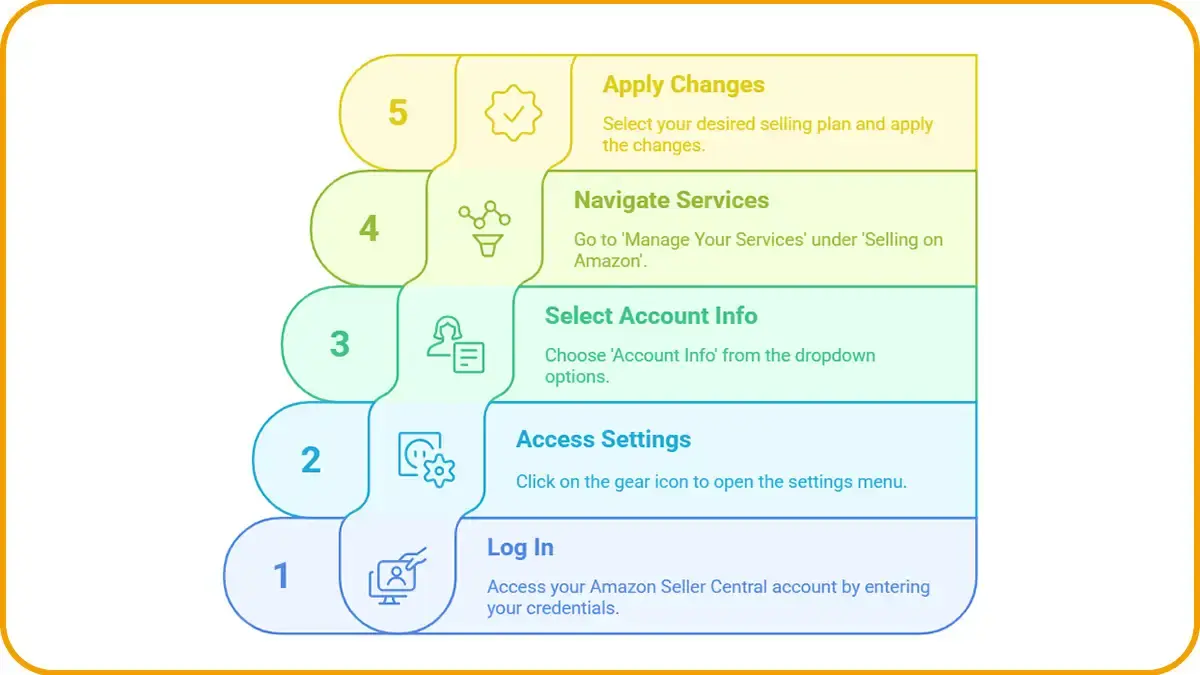
Steps to Switch Plans
Important Notes When Switching
- Upgrading to Professional: Your subscription starts immediately, and you get access to all advanced tools right away.
- Downgrading to Individual: If you use services that require a Professional plan, you’ll need to cancel them first.
Tips for a Smooth Transition
Switching plans is easy, but here are some tips to avoid issues:
Final Thoughts: Which Plan Should You Choose
Both Amazon seller plans have something going for them, and the right one depends on how much you sell, what you can spend, and where you want the business to go. If you’re only getting started, the Individual plan is usually enough. The Professional plan makes more sense once you’re growing and need better tools. Take a little time to understand the differences between Amazon Individual and Professional seller accounts before you commit. If you want to see what the dashboard and seller tools actually look like, our guide to Amazon Seller Central: Tools, Benefits, and How to Start covers it in detail.
Look at the fees and features side by side so you know how much an Amazon Professional seller account costs and whether it’s worth it for the number of orders you expect. And if you want to handle orders and day-to-day account work with less hassle, our Amazon Seller Central dashboard guide shows you what the dashboard can do.
Ultimately, choosing between Amazon seller plans depends on what your business needs right now. Think about how much you expect to sell, what the fees will cost you, and which features you can’t do without, then choose the Individual or Professional plan that fits. You’re not locked in, so revisit your plan every so often as your sales grow and your needs change.

FAQs
Simply register on Amazon under the Individual selling plan. If you plan to sell more than 40 items a month, you can switch to the Professional plan later.
No, your listings will stay the same. But if you switch to an Individual plan, some features like advertising and promotions won’t be available.
Yes, you can switch as often as needed. Just keep in mind that changes take effect immediately and may impact your billing.
No, there are no additional fees to switch. However, the fee structure changes depending on the plan you choose.
No, both Individual and Professional sellers can use FBA, but Professional sellers get lower fulfillment fees.
No, only Professional sellers have access to Amazon’s promotional and advertising tools.
You will retain access to Professional features until the end of your billing cycle, but you won’t be charged for the next cycle.
No, Amazon allows you to switch plans at any time without any long-term commitment or cancellation fees.
The Professional plan provides access to detailed reports and performance metrics. However, the Individual plan has limited tracking and analytics features.